Showing posts with label classroom tips. Show all posts

Tuesday, January 10, 2017

Formative Assessment and Classkick


Happy New Year friends! I'm so glad to get back to blogging. While I've been away, I have been learning about some of the best Apps for teachers. Right before Winter Break, I started using a formative assessment App called Classkick with my primary students and it's one of my new FAVORITE things. Are you using it in your classroom? If not, you should give it a try.

Classkick can be downloaded for free from the Apple App Store. Chromebook, laptop, or desktop users can access Classkick from classkick.com. Before I downloaded the App (my district requires iPad Apps to be approved and it takes a few days), I made QR codes that directed students to their Classkick assignment.

Classkick is very teacher friendly and their Web site has tons of tutorials and get started guides for every grade level. I watched a few tutorials and uploaded my first assignment in under an hour.

Students can work at their own pace and receive immediate teacher feedback by virtually raising their hand. Students can click on the hand icon when they need help or are ready to turn in their assignment. In my class, students know to be on the lookout for teacher feedback on their Classkick assignment before moving on to the next activity. I've also set the expectation that students need to go back and fix incorrect answers. After students fix their mistakes, I can drag "old" feedback that is no longer needed to the trash can to delete it. I enjoy the ability to "pass" the paperless assignment back-and-forth without exchanging any paper.

Teachers have the ability to upload any PDF assignments to Classkick. As a primary teacher, I have hundreds of paper assignments in my filing cabinets. I also have tons of Word and PowerPoint files (yes, I create/design my Add Some Sparkle materials in PPT) that can be saved easily as PDF files. I like the fact that I don't have to create a separate multiple choice, short answer, or true/false assignment in order to use Classkick as a formative assessment tool. I'm all for working smarter, not harder.

Teachers have the ability to record their voice on assignments. Instead of typing out a bunch of written directions, I simplified my teacher directions and recorded a short audio segment with the steps students should follow to complete the assignment. Students could go back and listen to the audio directions as many times as they needed.

Classkick's Whole Class View is a dashboard that allows the teacher to see every student working on the assignment in real time. It's a bit mesmerizing to watch students all working at the same time at their own pace. As students are working on their assignment, I pull up and monitor the Whole Class View. With this view pulled up, I can monitor which students are needing my help, assess and provide feedback on assignments that are completed, award points for assignment completion, and export the assignment data.

I would love to hear how you're using Classkick in your classroom. What are your favorite things about it? Let's share ideas.


Tuesday, June 28, 2016

Hashtags and Community Building

Hello friends! I've been so inspired by #miss5thswhiteboard on Instagram and how she uses her classroom whiteboard to engage her students and build community that I want to do something similar with my 2nd graders.  

Have you seen some of the incredible work on Instagram? Check it out because it is AMAZING.

It got me thinking about how I could incorporate weekly social media hashtags to "frame" the whiteboard conversations in my classroom. Students would use a dry erase marker to post their response to the question or conversation topic of the day. Here's an example of how I plan to use this tool in my classroom below:

Aside from creating academic connections, I'm also excited about the opportunity to inspire some lively conversations and connections among us as a classroom community.

I compiled some of my favorite weekly social media hashtags for you below:
Click here to download a copy for yourself Social Media Hashtag Freebie.

I'd love to hear from you and how you've used your whiteboard to inspire community building in your classroom. Send me a tweet @addsparkle88 or follow me on Instagram @addsomesparkle88


Sunday, November 1, 2015

No More Money Egg Drama

In the past, I dreaded teaching counting money because it meant that I had to use those plastic "money eggs" with my math groups. You know what I'm talking about, right? Those plastic Easter eggs that we "saved" from last season and stuffed with a group of coins and stored in an egg carton.

What happened when students used them? Coins fell out of the eggs and got lost so my teacher answer key never matched up with the amount the students counted. The students switched the tops and bottoms of the eggs (yes, even though they were color coded) so that my "numbered" eggs ended up all mixed up. The not-so durable plastic eggs and egg cartons cracked/broke/fell apart and their contents fell all over the floor. What a disaster!

What is a teacher to do? I say get rid of them. I decided to work SMARTER not HARDER. So get out your Popsicle sticks (Jumbo sized preferably) and hot glue gun. Turn your money eggs into money sticks by hot gluing your coins to a Popsicle stick and solve all of your pesky money egg problems.

To easily differentiate and meet the needs of all of your students, vary the placement of the coins on the stick. Green money sticks feature amounts less than $1.00 and coins are arranged largest to smallest amount. Red money sticks feature amounts greater than $1.00 and are arranged randomly for a more real-life type of counting situation.
Another benefit of using money sticks? They are very versatile. Students used the money sticks to compare different amounts of money using the greater than, less than, and equal to symbols. 

We also played the game "kaboom" with money sticks. Without peeking, students drew money sticks out of a container. If the student was able to successfully count the money amount on the stick, they got to keep it. If they were wrong, they put it back into the container. When they drew the "kaboom" stick, they had to put all of their winning sticks back into the container and start over.

I'd love to hear how you are ditching those eggs for money sticks in your classroom. Tweet me @addsparkle88, IG at addsomesparkle88, or connect with me on Facebook at Add Some Sparkle. See you next time friends! 

Sunday, August 2, 2015

Bulletin boards that are really *Super*

Hello Friends! I'm linking up today with some of my favorite Second Grade Teachers, Angie Olson from Lucky Little Learners @MrsAOlson and Ashley Schroeder from Schroeder Shenanigans in 2nd @schroedershenan. As we approach Back-to-School time for many of us, we're talking about bulletin boards on the blog today. 

Ok....confession time. (Deep breath in.....and exhale.) I'm must admit that putting up bulletin boards is not my favorite thing in the world as a teacher. Phew! I just said that sentence really fast. Before you start blowing up my comments section with your disbelief and disagreements, I just want to say that I KNOW that as a Second Grade teacher I should love this opportunity to be crafty but I really don't. Here's what I don't love about it.....for each unique and creative idea that I come up with, I draw a blank with the upcoming new season, theme, unit, etc. It's too much pressure and it stresses me out! 

Well friends....I've decided to do a Super Hero theme this year where the majority of the backgrounds, borders, and decorative trim will stay up all year long. I'm going to be all about working smarter, not harder. However, the student work will vary. It's an idea that's so simple but SO good! Why in the world haven't I thought of this before year 9 of teaching? 

Check it out below and let me know what you think. (Don't you just LOVE this little guy?)


The top picture shows off my classroom bulletin board in the hallway. I have 26 incoming 2nd Graders so I tried to keep as much space available for student work as possible. I'm going to need every inch of space. The blue paper works well for two reasons, it becomes a nice "neutral" color that looks good with a variety of student work posted on it and it looks like the "sky" when I post my Krista Wallden Superhero Kids Clip Art around the board. It's all ready for the first day of school and Deanna Jump's awesome Super Hero Craftivity and Writing Assignment that I found on TpT. The bottom picture shows off the inside wall of my classroom where I'll hang student work on "thought bubble" clothespin clips with their names. To add some durability to the design, I hot glued push pins to the backs of the clothespins.


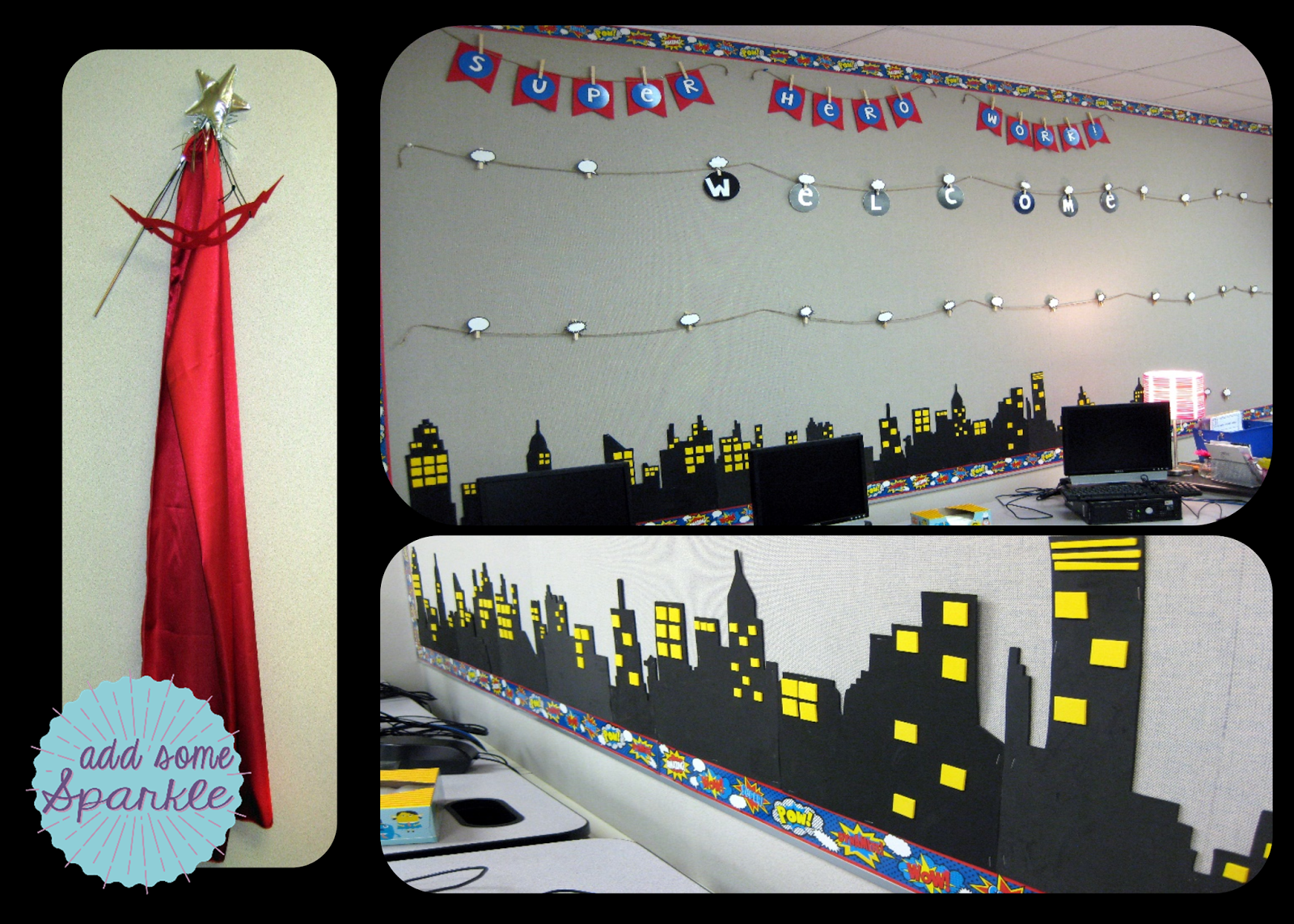
Here's a close up of the Super Hero Work Wall complete with a night time Cityscape made out of foam to give it some depth. I Googled images of cities and used my overhead projector to trace the images onto large pieces of foam board. I'm really pleased on how well the design turned out since the wall space takes up one entire wall of my classroom.


I think I'm addicted to making banners for my classroom. Here's one that says "Grow" but I also have ones that say "Read" and "Learn" all made from felt.

I've even tried to spruce up my desk area with the Super Hero theme by hanging *my* cape, mask, and magic wand next to artwork that gives my students a glimpse into my personality and favorite things - flip flops and the beach, caffeine (I love all kinds), and Disney. They always think it's cool when I tell them that I worked at Walt Disney World in college so it give us something to talk about right away.

So...what do you think? I must admit that I'm really pleased about how the bulletin boards turned out. Who knows? I might just change my mind about bulletin boards after all. 

Have a great beginning of the school year friends!


 photo Stacey Blog Signature_zpsujslgn3h.png